

WordPress vs Squarespace
for Small Business USA —
Which Wins in 2026?
Choosing the wrong platform could cost your US small business thousands of dollars and months of lost Google rankings. We compared every factor — pricing, SEO, design, ecommerce, and long-term value — so you can make the right call.
Quick Overview — The Bottom Line Upfront
If you have landed on this page, you are a US small business owner trying to decide between WordPress and Squarespace for your website. This is one of the most common questions we get at CodePulse Studios, and the honest answer is — for most US small businesses, WordPress wins. But not for every situation. This guide breaks down every important factor so you can decide for yourself.
According to W3Techs, WordPress powers 43.5% of all websites on the internet — including the majority of US small business websites. Squarespace powers around 3.7%. That gap exists for good reasons, which we will walk through in detail below.
Pricing Comparison — What You Actually Pay Each Year
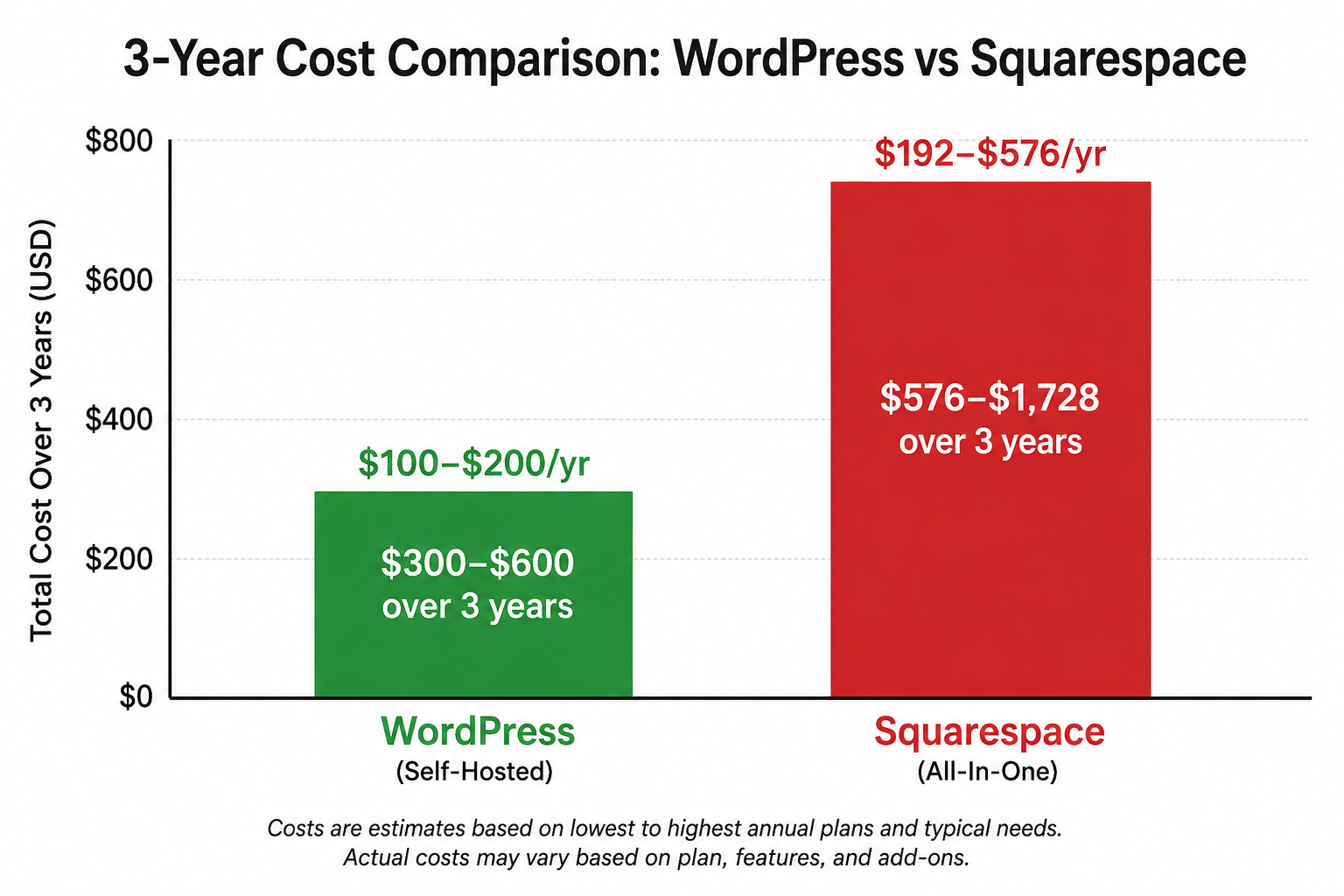
One of the biggest misconceptions US business owners have is that Squarespace is cheaper than WordPress. That is only true in year one — and only if you compare the wrong things.
WordPress costs
WordPress itself is completely free — it is open-source software. Your actual costs are hosting and a domain name. Shared hosting from providers like SiteGround or Bluehost typically costs $35–$120 per year for a US small business site. A domain name is around $12–$15 per year. Total: $50–$150 per year to run a professional WordPress site.
Squarespace costs
Squarespace charges a mandatory monthly subscription — there is no free plan for business use. Their plans run from $16 to $48 per month billed annually, or higher if billed monthly. For a US small business needing ecommerce features, you need at least the Business plan at $23/month — that is $276 per year, every year, forever. Want to sell products with no transaction fees? That requires the Commerce plan at $28–$52/month.
Over 5 years, a US small business on Squarespace’s Business plan pays $1,380+ in platform fees alone — before any design or development work. A WordPress site on the same timeline costs $500–$750 total for hosting and domain. The difference funds an entire website redesign.
Winner: WordPress — significantly cheaper long-term, especially as your US business scales and you need more features.
SEO Capabilities — Which Platform Ranks Better on Google in the USA
This is arguably the most important factor for US small businesses. Your website is useless if US customers cannot find it on Google. Here is how each platform performs on the SEO factors that matter most in 2026.
WordPress SEO
WordPress gives you complete control over every SEO element. With a free plugin like RankMath, you can customize title tags, meta descriptions, schema markup, canonical URLs, XML sitemaps, and Open Graph data for every single page and post. You can also implement local business schema — critical for US businesses targeting local search. Page speed, which Google uses as a direct ranking factor, is also fully under your control through plugins like WP Rocket and Smush. Read our full guide on the best WordPress plugins for US small businesses in 2026.
Squarespace SEO
Squarespace has improved its SEO capabilities noticeably since 2023, but it still lags significantly behind WordPress. You can edit basic title tags and meta descriptions, and it generates automatic sitemaps. However, you have no control over schema markup, limited control over page speed (their servers handle it), and no plugin ecosystem for advanced SEO features. Multiple independent SEO studies including analysis by Ahrefs have found WordPress sites consistently outrank Squarespace sites for competitive US local search terms.
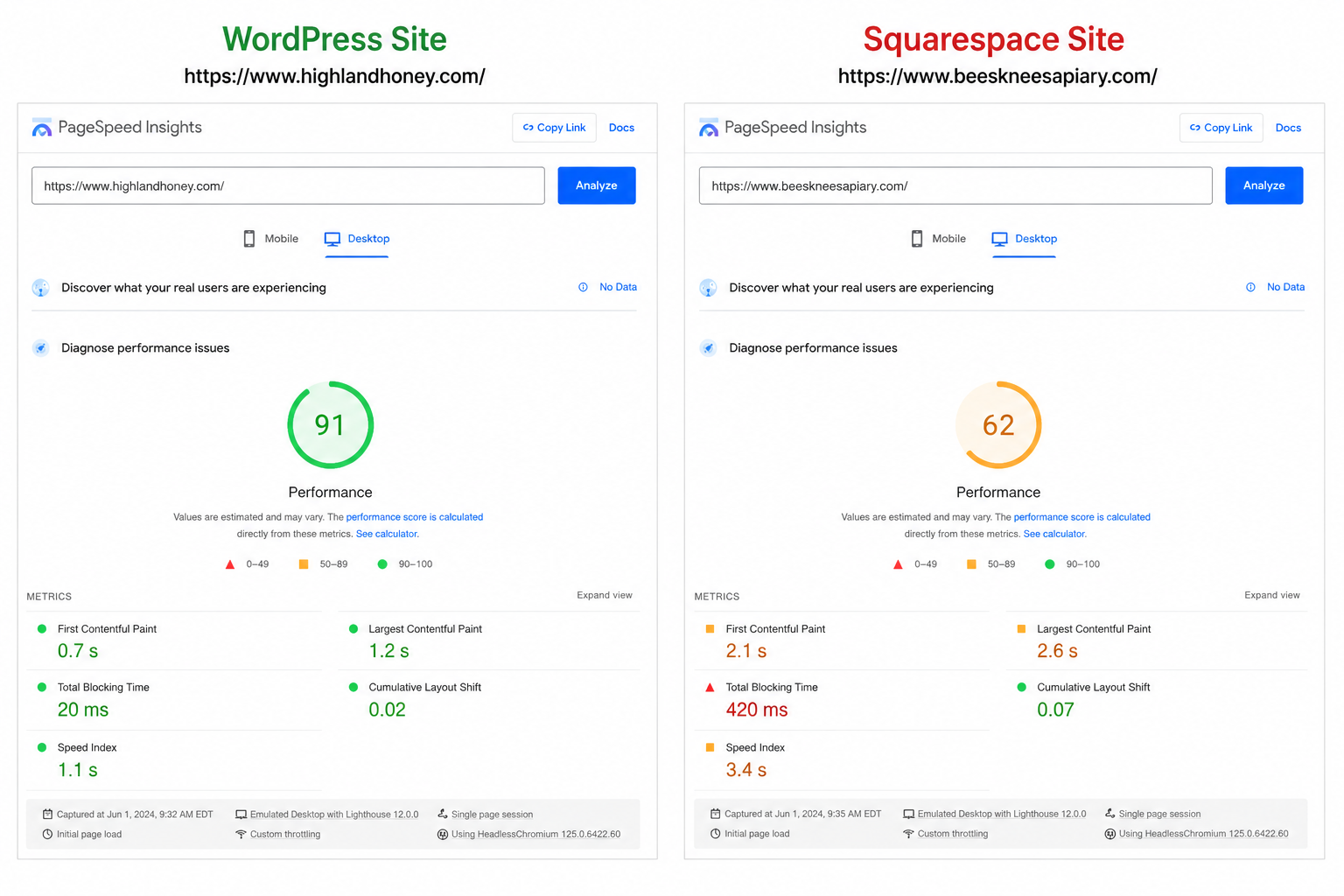
Winner: WordPress — by a wide margin. If ranking on Google in the USA matters to you, WordPress is the only real choice.
Design Freedom — How Much Can You Actually Customize
This is the one area where Squarespace genuinely competes. Their templates are beautiful, modern, and cohesive — and they are very easy to customize without any technical knowledge. If you want a polished, good-looking website in an afternoon, Squarespace makes that easier than WordPress.
However, Squarespace design freedom stops at the template boundary. You can change colors, fonts, images, and some layout elements — but the overall structure of the template is fixed. You cannot build a custom layout from scratch, implement unusual design elements, or add features the template does not support.
WordPress, combined with the Blocksy theme (which we use for most of our US client projects) and the Gutenberg block editor, lets you build any design you can imagine — from a basic business site to a fully custom layout with animations, custom sections, and brand-specific interactions. The only limit is your imagination (or your developer’s skill).
Squarespace has roughly 180 templates — and millions of websites use them. Your US competitors may be using the exact same template. A custom WordPress site built by CodePulse Studios is 100% unique — no other business on the internet will have the same design.
Winner: WordPress — for full design freedom. Squarespace wins only if you want a quick, beautiful site without any customization needs.
Ecommerce — Selling Online for US Small Businesses
Both platforms support ecommerce, but the difference in cost and flexibility is dramatic for US businesses.
WordPress + WooCommerce
WooCommerce — the free WordPress ecommerce plugin — powers over 28% of all online stores worldwide. For US small businesses, this means access to all major US payment gateways (Stripe, PayPal, Apple Pay, Google Pay), automated US state tax calculations, integration with USPS, UPS, and FedEx shipping, and thousands of extensions for every business need. WooCommerce takes zero transaction fees — Stripe’s standard US rate of 2.9% + $0.30 is all you pay.
Squarespace Commerce
Squarespace’s ecommerce is functional and well-designed, but significantly more limited. The Business plan charges a 3% transaction fee on every sale in addition to payment processor fees — on top of your monthly subscription. You need the Commerce plan ($28–$52/month) to avoid that extra fee. Payment options are more limited, and the inventory management tools are basic compared to WooCommerce.
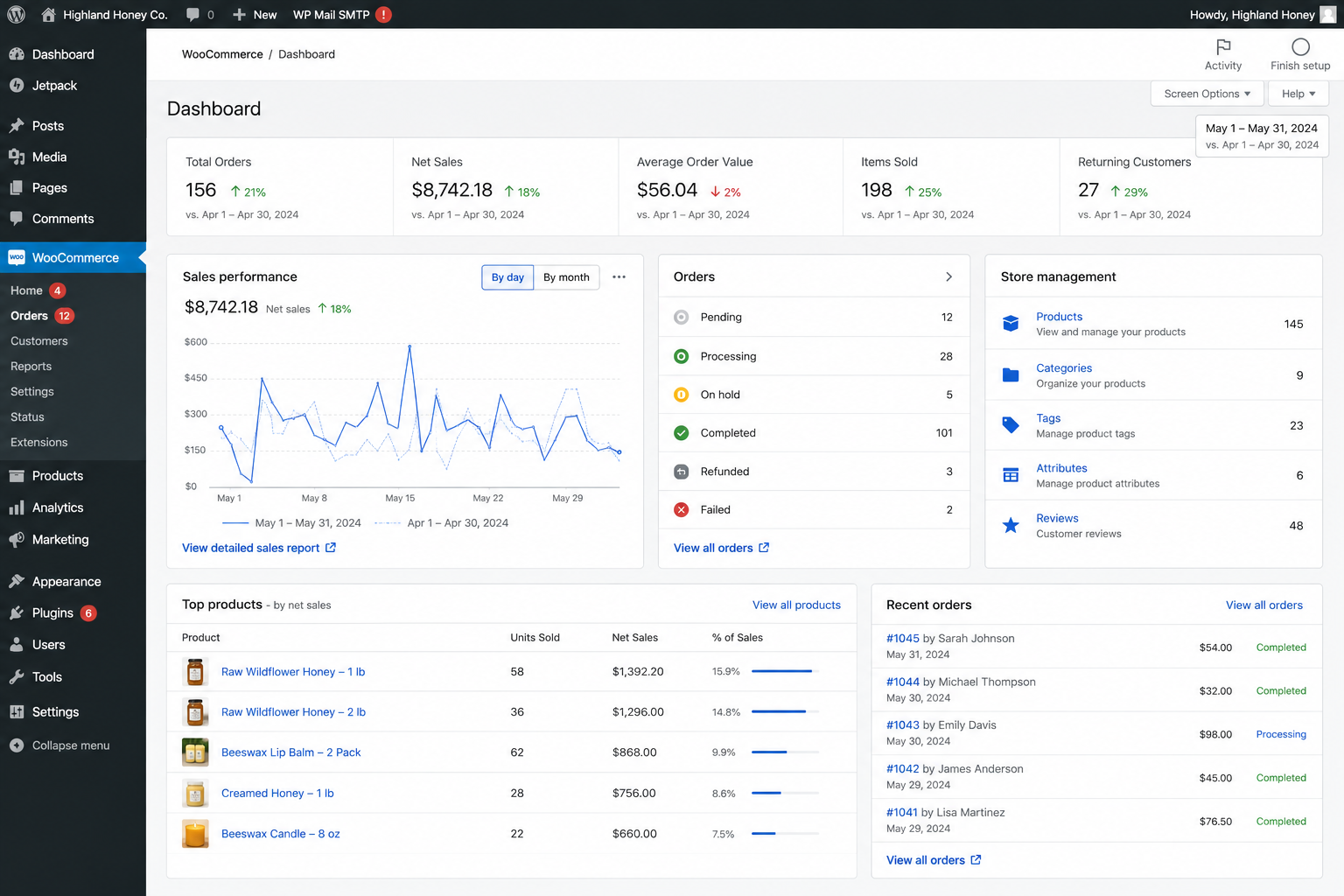
Winner: WordPress + WooCommerce — lower fees, more payment options, better inventory management, and full ownership of your store data.
Ease of Use — Who Is Each Platform Built For
Let us be honest here: Squarespace is easier to use than WordPress. If you have never built a website and want to do everything yourself without learning anything technical, Squarespace will get you there faster.
WordPress has a learning curve. The dashboard, plugin management, theme settings, and Gutenberg block editor take time to understand. However — and this is important — most US small business owners are not building their WordPress site themselves. They hire a developer to build it, then log in once a week to update their blog or change a price. For that use case, WordPress is no harder to use than Squarespace day-to-day.
At CodePulse Studios, we deliver every project with a full training session — so our US clients can manage their own WordPress sites comfortably from day one, without any technical background. See our WordPress development services for US small businesses for what that includes.
Winner: Squarespace — for pure DIY ease. WordPress wins once a developer is involved.
Full Comparison Table — WordPress vs Squarespace for US Small Business
| Feature | WordPress | Squarespace |
|---|---|---|
| Annual cost (basic) | $50–$150/yr | $192–$576/yr |
| Platform fee | Free (open-source) | Mandatory subscription |
| You own the site 100% | Yes — always | No — hosted on their servers |
| Google SEO control | Full control | Basic control only |
| Schema markup | Full — via RankMath | Very limited |
| Page speed control | Full — via plugins | Partial — server-managed |
| Design templates | Unlimited via themes | ~180 templates |
| Custom design | 100% custom possible | Limited to template structure |
| Ecommerce fees | No platform fee | 3% fee on Business plan |
| Payment gateways (USA) | Stripe, PayPal, Apple Pay, Google Pay + more | Stripe, PayPal only |
| Plugin / app ecosystem | 59,000+ free plugins | ~30 limited extensions |
| Blogging / content | World-class | Good but limited |
| Ease of setup (DIY) | Moderate — learning curve | Very easy |
| US local SEO tools | Full local schema, GMB integration | Very basic |
| Customer support | Community + paid options | 24/7 live chat |
Final Verdict — Our Recommendation for US Small Businesses in 2026
After comparing every important factor, WordPress is the better platform for the majority of US small businesses in 2026. It costs less over time, gives you far more control over your Google rankings, lets you build anything you can imagine, and — most importantly — you own everything. No monthly fees. No platform lock-in. No risk of Squarespace changing their pricing and trapping you.
The one exception is this: if you are a solo business owner who wants to build and manage your entire website yourself without any technical help, and you do not care about ranking on Google or having a unique design, Squarespace will get you a presentable site faster. But even then, the monthly fees add up, and the SEO limitations will hurt you as you try to grow.
Hire a developer to build your WordPress site properly — with correct SEO setup, fast loading speed, and a custom design that stands out. At $399–$699 one-time (compared to $276+ per year on Squarespace), a professionally built WordPress site pays for itself in the first 12–18 months through lower ongoing costs alone — before you even count the better Google rankings and leads it generates.
If you are ready to move forward with a professionally built WordPress website for your US business, get a free quote from CodePulse Studios. We have delivered 200+ WordPress projects for US businesses and we can have your site live in 7–14 days.
Ready to Build a WordPress Website for Your US Business?
Skip Squarespace’s monthly fees. Get a custom, SEO-ready WordPress website built by CodePulse Studios — delivered in 14 days, starting at $399.
→ View WordPress Services

[…] For more WordPress guides tailored to US small businesses, check out our post on how to rank your WordPress website on Google in the USA, or our guide on WordPress vs Squarespace for US small businesses. […]